I built a digital calendar
Years ago, I was gifted a Lenovo/Google Assistant smart clock. It was good! It's not necessary by any means, but I liked that it was a smart speaker with physical buttons, and I liked that I could set alarms by talking to it instead of memorising the arcane button sequences many digital clocks expect you to know. I liked that it had a nightlight built in.
It no longer works. I don't know why. It simply refuses to connect to Google. My guess is it has a built-in root TLS certificate which has expired, and now it doesn't believe Google is Google and cannot be told otherwise.
Oh well. It can always just be a dumb clock with a built-in Bluetooth speaker, right?
Wrong. If you don't complete the connection process to Google's servers, it refuses to even be a clock. Even if it did, the only way to pair a Bluetooth device is to say "hey Google, pair Bluetooth", which requires the servers.
So I put it in my Electronics Graveyard, where I found an old 9" HDMI screen. It's about the size of a DVD case. It'd been in the graveyard for years. I'd moved it there because it didn't turn on, but I always hoped it might again one day. And by some random chance, it did! The problem was the Micro-USB power supply — but it also had a socket for a 12V barrel jack. I'd never tested that one because I didn't have a suitable power supply. Well, guess what kind of power supply my stupid e-waste clock is no longer using!
So, great! I plugged in the screen, and plugged the Raspberry Pi I used for controlling my Roomba via HDMI, and via USB for power. That meant I had a fully contained unit with one plug (although currently the brains of the system are connected by cables rather than housed inside it, like an Ood).
Next, I needed to put something on the screen. My plan was to run a little web server which serves one page, which displays a clock, and updates it using setTimeout, then run a browser on the screen that shows that page. This did not work, because the Pi is a Zero W, which is a very capable computer with half a gigabyte of Ram. This is, by any reasonable standard, a huge amount of memory, but it is not enough to run Google Chrome. Or Firefox. Or Epiphany, whatever that is.
But it can run Dillo, a browser that supports CSS2.1 and no Javascript at all. OK. I can work with that.
So instead, I wrote a Node script that generates a static HTML page and saves it to the SD card, and a batch file that runs that script, then opens Dillo and points it at the generated page. (A webserver would run just fine and save on SD card writes, but it's fine and writing the file to the drive makes debugging much easier.)
Of course, a static page is no use as a clock, so the script then enters an infinite loop, in which it sleeps for one minute, before re-running the Node script, and using xdotool to send keystrokes to Dillo to refresh the page.
So now the question is, what to put on the page?
Both Google Calendar and Todoist allow you to export your events and tasks as an ICS feed with an in-URL token for authentication. This isn't very secure, but there's no way Dillo is going to be able to log into Google Calendar so this is what we've got. (The tokens can be cycled if somehow someone steals my Pi Zero.)
Fetching and parsing the ICS feeds is not terribly fast, so it caches them for 15 minutes at a time. But that means at, at least sometimes, the screen might go a couple of minutes without an update, so the clock has to be kept a bit vague. In the end, though, I think I like that. So this is what I ended up with:
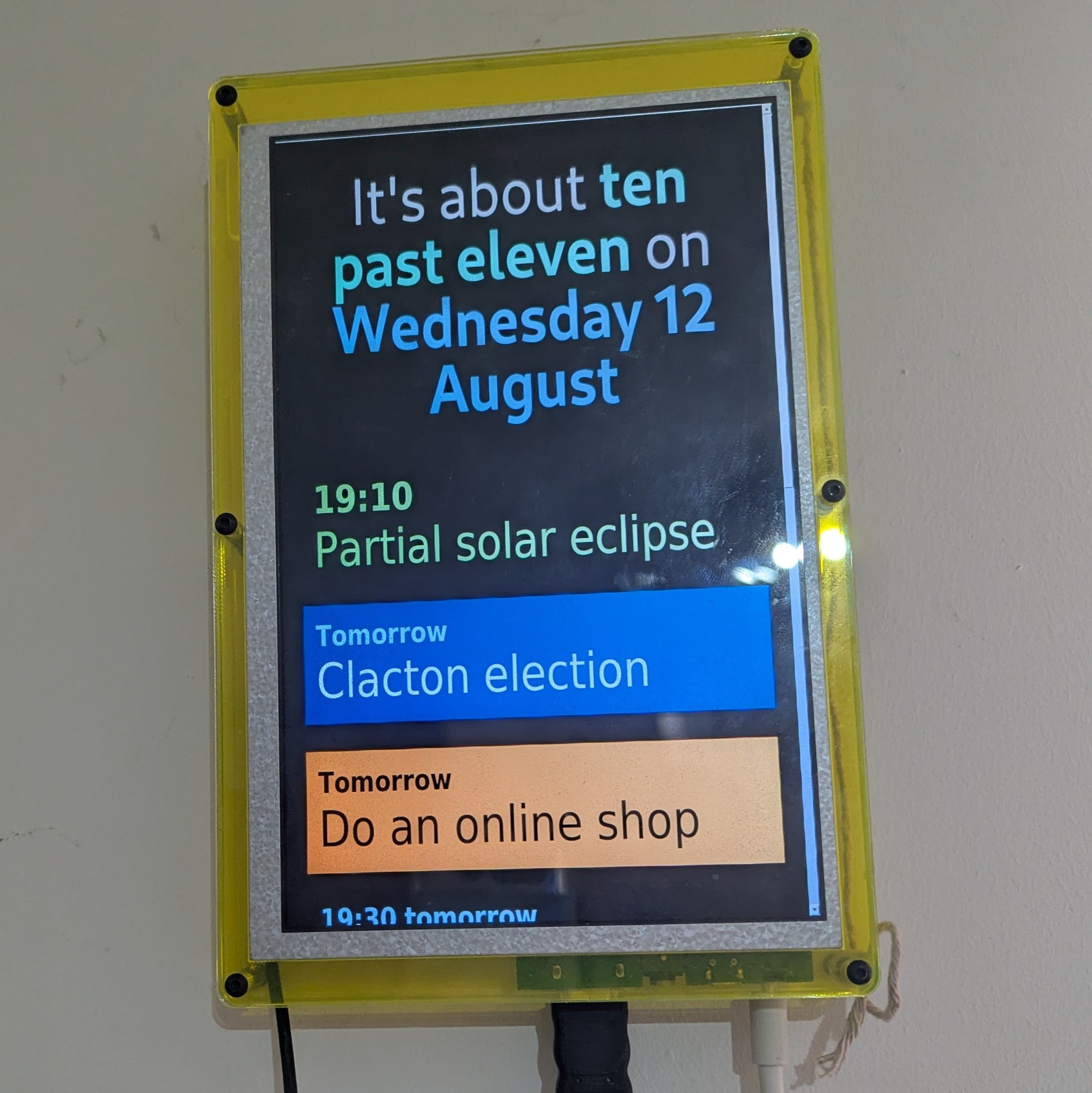
The other service it connects to is my Philips Hue lights — these have a nice Json API which connects to a little box in my flat without going through the internet. The screen can't control the lights, but it can tell when I turn them off and switch to a much dimmer colour scheme, to avoid being too bright a light while I'm trying to sleep.
I haven't had it running for long enough yet to know if I'll keep it in its current state, or change it, or turn it off. So far it feels like having a glowing screen with my next task on it is pretty good for the old ADHD, but new systems always do.
The code is available on Codeberg if you want to make your own. I don't know where you'd get a screen, though. Normally I'd say you could simply buy a computer with more Ram rather than working around the silly constraints I did, but I think the current shortage is a good opportunity to highlight that we don't actually need 16GB of Ram to make things, much less generative AI. We can make cool stuff with basic tools on tiny computers.
I've done a little more work on this since posting this.
I have moved the page generation to a server model. Partly that's because I like the idea of having a second page I can access from my phone to set options on the screen (although I've not really done anything with this yet). But mostly it's because the server can fetch the calendar updates in the background, so now even though refetching the calendar is slow, every page load is fast. This means I can refresh the display every 30s with no issue. Moreover, the refresh commands are sent from the server, which is just Node, so I can time them to land when the minute changes. I haven't replaced the wordy clock with a numeric one, but I did update the word "almost" to be slighty more specific, as well as having a few synonyms thrown in for variety.
I've also added some code so that if there's more than one task due today, it will pick one of them to show and ignore the rest. This just means the calendar is never pushed completely off the screen by the task list. The task to show is chosen when the page is rendered, so it changes every 30s and every task gets shown.
Lastly, I changed the brighness settings a little — the screen drops to 50% brightness when the lights are off, and 20% when the lights are off and it's between 11PM and 7AM. Also during those night hours, the clocks says "on the evening of" or "on the morning of" before the date, to further clarify which side of midnight you're on if it's late.
The night mode also hides events that are too far in the future. This is because the brightness control is just making all the CSS colours darker, and doesn't affect the scrollbar. I haven't found a way to hide the scrollbar using the subset of CSS that Dillo supports, so just minimising the chances of it appearing is all I've got.
I don't think this is going to be a big ongoing project, but it will likely get updates as and when something annoys me about it.